Complete Guide: How to Use the Naam Jap Voice Counter
How the Progressive Web App (PWA) Works Offline
The Naam Jap Voice Counter is engineered as a modern Progressive Web App (PWA). When you visit the website for the first time, our Service Worker automatically caches all core HTML, CSS, JavaScript, audio chime files, and user interface components directly into your device's persistent browser storage.
This provides distinct real-world advantages for practitioners:
- Instant Load Speeds: Subsequent visits launch instantly in milliseconds, even on slow 2G mobile data connections or in remote pilgrimage towns with zero cellular signal.
- Zero Installation Friction: You receive all the benefits of a native mobile app without needing to download large 150-megabyte files from commercial app stores.
- Zero Battery Waste: The lightweight, optimized codebase runs with minimal CPU and memory overhead, preserving your phone battery during extended morning chanting sessions.
Fine-Tuning Speech Recognition for Custom Mantras & Regional Accents
India is a land of rich linguistic diversity, with hundreds of distinct regional accents and phonetic inflections. To ensure your custom mantra phrases match with highest precision:
- Language Selector Alignment: When chanting in regional traditions (e.g. Gujarati, Marathi, Punjabi, Bengali, or Tamil), set the language dropdown to your specific native tongue. This activates the matching phonetic model inside the browser.
- Phonetic Spelling Variants: If a custom mantra phrase is occasionally misrecognized due to fast tempo, try entering both the standard Devanagari script and the phonetic Romanized spelling into the Custom Mantra field.
- Audio Sensitivity Calibration: Maintain a steady distance of 1 to 2 feet from your device microphone to avoid acoustic clipping or breath distortion.
Hands-Free Chanting in Modern Daily Life: The Purpose Behind This Counter
Maintaining a steady rhythm of Naam Jap throughout modern daily life is a practical challenge shared by thousands of sincere householders and working practitioners. When hands are occupied with daily chores, cooking meals in the kitchen, or walking outdoors, holding a sacred wooden mala with dusty or wet hands feels disrespectful, while mechanical plastic tally clickers can feel distracting, noisy, or prone to jamming in pockets.
This led to a simple, respectful aspiration: Can modern technology serve as a quiet, unobtrusive companion to daily devotion—listening gently to our spoken prayer through the device microphone and keeping count, without requiring us to stare at or touch a glowing screen?
The Naam Jap Voice Counter was created to fulfill this exact need: a simple, hands-free voice counter that listens to your spoken mantra in real time, increments counts accurately, provides gentle temple chime notifications upon reaching 108-bead mala milestones, and preserves your spiritual streak locally on your device with complete privacy.

Step-by-Step Operating Tutorial
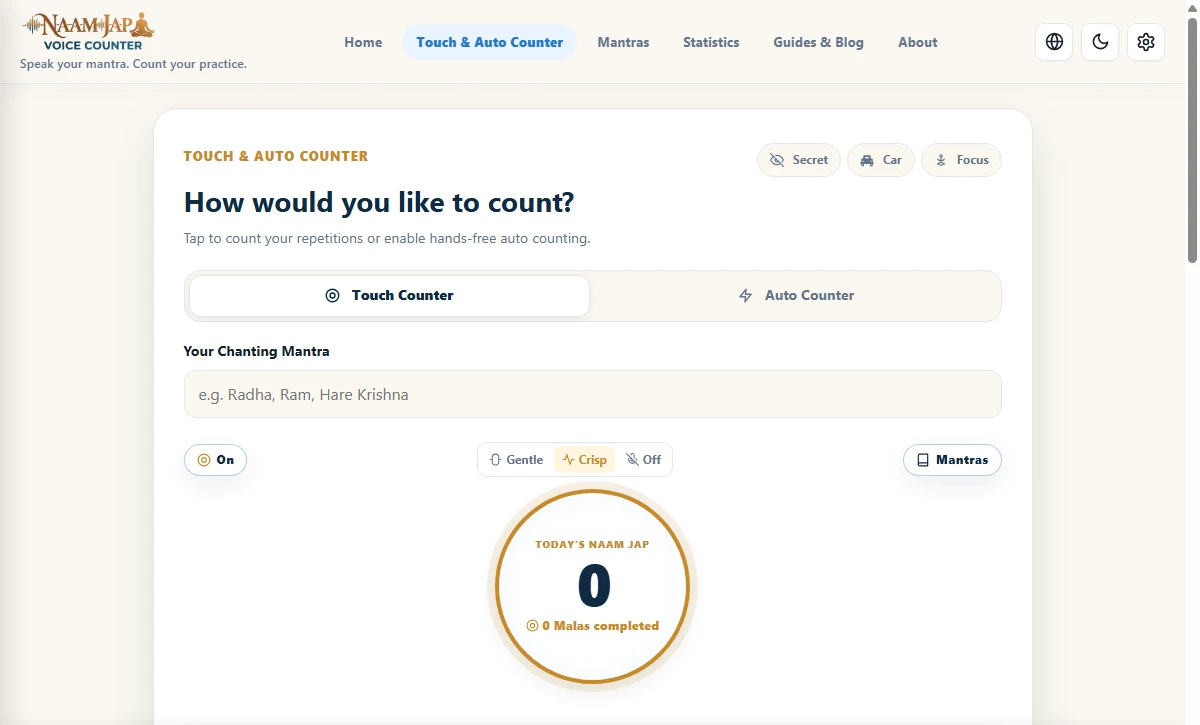
- Step 1: Select Your Sacred Mantra: Open the home screen. Choose from popular sacred presets (such as Radha, Hare Krishna, Ram, Om Namah Shivaya, or Waheguru), or click the Custom Mantra button to type your personal family Ishta phrase in English or Devanagari script.
- Step 2: Set Speech Language: Select your preferred recognition language (Hindi, Sanskrit, Gujarati, Punjabi, Bengali, Tamil, Telugu, Marathi, or English). Setting the exact native language helps the phonetic engine match regional pronunciations with highest precision.
- Step 3: Grant Microphone Permission: Click the large central microphone button. When your web browser displays the standard security permission dialog ("Allow access to microphone"), click Allow.
- Step 4: Configure Your Target Count: Set your target count (such as 108 for one traditional mala, 540 for 5 malas, or 1008 for deep morning sadhana). A soft, soothing temple chime will sound when you reach your goal.
- Step 5: Begin Chanting: Speak clearly at your natural cadence. Watch the large numeric display increment in real time with every completed repetition.
Your privacy during sacred prayer is completely non-negotiable. The Naam Jap Voice Counter processes your microphone audio stream entirely in temporary device memory using standard browser Web Speech APIs. Zero audio files (.wav, .mp3) are ever recorded, saved to disk, or transmitted to cloud servers.
Specialized Counting Environments: From Altar to Car & Metro
- 1. Voice Mode (Hands-Free Speech Engine): Uses real-time acoustic recognition to detect every spoken phrase. Ideal for morning seated sadhana, walking, cooking, and household chores where your hands are busy.
- 2. Touch Mode (Full-Screen Tap): Turns your entire smartphone display into a responsive touch surface. Tap anywhere on the screen with your thumb to increment the count, perfect for silent meditation in bed or quiet library settings.
- 3. Auto Mode (Metronome Pacing): Sets a steady, rhythmic timer that increments the counter automatically at your chosen speed (500ms to 5000ms slider). It acts as an acoustic pacemaker during silent mental (Manasik) japa.
- 4. Car Driving Mode: High-contrast dashboard with automated voice announcements ("Mala 1 Complete", "Mala 2 Complete") so you can chant safely behind the wheel without ever glancing at your phone.
- 5. Stealth Mode (Digital Gaumukhi): Complete blackout screen with gentle haptic vibration per count, allowing discreet japa in offices, crowded metros, and flights without displaying glowing numbers.
Microphone Permissions & 1-Click Hardware Recovery
If you accidentally clicked "Block" or the microphone stream fails to initiate, use our built-in 1-click recovery:
- 1-Click 'Retry Microphone' Button: Whenever microphone access is denied or temporarily interrupted, the counter displays a direct Retry Microphone button to re-trigger the browser prompt without reloading the page.
- Brave Browser Setting: In Brave, open
brave://settings/systemand toggle ON "Use Google services for speech recognition". - Android Google Chrome: Tap the lock/tune icon to the left of the URL address bar, tap Permissions, find Microphone, and toggle it to Allow.
- Apple iPhone (iOS Safari): Open iOS Settings > scroll down to Safari > under Settings for Websites tap Microphone > select Ask or Allow.
- Windows / Mac Desktop Chrome: Click the padlock (🔒) icon on the left of the address bar, set Microphone to Allow, and tap Retry.
Fresh Count vs. Daily Cumulative Total
Many practitioners chant at multiple times during the day—such as in the morning, afternoon, and evening. A common challenge with standard counters is wanting to start counting anew on screen without wiping out the overall daily total.
The Naam Jap Voice Counter solves this with an intelligent dual-register architecture:
- Fresh Count: Resets your active on-screen display back to zero whenever you want to begin counting afresh.
- Daily Cumulative Total: Preserves every single repetition completed throughout the 24-hour calendar day. Starting a fresh count never erases your daily total, lifetime total, or active sankalp streak.
Advanced Features for Dedicated Practitioners
Beyond basic counting, the platform includes specialized tools to deepen your daily practice:
- Audio Feedback Selection: Choose between traditional bronze temple bell sounds, wooden bead clicks, soothing singing bowl chimes, or complete silence (visual counter only).
- Detailed Statistics Dashboard: View your daily, weekly, and monthly chanting totals, average chanting speed, and unbroken habit streaks.
- Data Backup and Portability: Export a full encrypted JSON backup of your chanting history anytime from the Statistics page to transfer your records across new phones or laptops.
Data Portability, Zero-Cloud Sync & Device Transfer
Because the Naam Jap Voice Counter values spiritual privacy and operates without cloud databases or accounts, your sadhana records live safely on your device. When upgrading phones or switching between a desktop altar and a mobile phone, our Zero-Cloud Sync Suite provides multiple instant synchronization methods:
- SnapQR Instant Camera Migration (Under 2 Seconds): Tap Tools & Settings ➔ Device Sync on your old device and select SnapQR. An encrypted QR code appears. Simply scan it with your new phone's camera to instantly migrate your lifetime mala count, streak records, practice notes, and custom mantras.
- Offline Local Wi-Fi Host Sync: Connect two devices to your home Wi-Fi to sync sadhana sessions directly without consuming cellular data or uploading anything to external servers.
- 6-Digit Ephemeral Connect Code (WebRTC P2P): Establishes a direct peer-to-peer data tunnel between devices that self-terminates as soon as synchronization finishes.
- Selective JSON Backup & Merge: You can also export a human-readable JSON backup anytime from the Statistics page, with non-destructive merge support so new counts never overwrite previous records.
Power Efficiency: How the Audio Engine Preserves Battery
A frequent concern among practitioners who chant for multiple hours every day is battery consumption. Traditional voice recording apps consume excessive power because they constantly write raw audio files to disk and compress multimedia streams in real time.
The Naam Jap Voice Counter was engineered with a ultra-low-power event-driven listener. Instead of encoding heavy audio tracks, the browser directly processes lightweight mathematical spectrograms in short 50-millisecond slices. Testing across entry-level Android devices and flagship Apple iPhones confirms that a full 108-count mala session consumes less than one percent of device battery, allowing you to sustain your sadhana all day long without searching for a charger.
Frequently Asked Questions About the Voice Counter
Does the Voice Counter record or upload my audio to a server?
No. The Naam Jap Voice Counter uses client-side browser speech recognition. Your microphone audio is processed locally on your device in real time; zero audio files are recorded or uploaded.
Can I add my own custom mantra phrase to the counter?
Yes. On the home screen, select Custom Mantra, type your preferred holy name in English or Devanagari script, and start chanting immediately.
What should I do if the counter misses words in a noisy room?
Position your phone roughly 1 to 2 feet away facing your mouth, or plug in standard wired earphones with an inline microphone to isolate your voice from background noise.
Does the Voice Counter work offline without internet?
Touch and manual counting modes work completely offline. Voice recognition depends on your browser engine; devices with on-device speech packs (such as modern Android and Chrome) can process voice offline seamlessly.
How does Fresh Count differ from the Daily Total?
Fresh Count allows you to reset your on-screen counter back to zero at any moment without wiping your daily cumulative total, lifetime malas, or active streaks.
How do I sync my counts between my phone and computer?
Open Device Sync from the top menu, choose SnapQR on one device to generate a secure QR code, and scan it with the other device to transfer your counts in under 2 seconds without cloud accounts.